Sibley Birds 2nd Edition
- 4.3
- Rating
- 10.00K
- Installs
- $19.99
- Price
 Analysis by App-foxy
I approached Sibley Birds 2nd Edition as a field reference rather than as a casual birdwatching game or a lightweight identification toy. It is a Books & Reference app from mydigitalearth.com, built around identifying North American birds through a call or a picture. That focus makes it most useful when I already have a bird in front of me and need a dependable way to narrow down what I am seeing or hearing.
My overall impression is positive, but this is an app that rewards preparation. The reference material is more valuable when I understand how I want to use it before heading outdoors. If I expect a single tap to solve every identification, I may find the process slower than a general image-search tool. If I want a serious companion for learning bird appearance, range, and vocal clues, the experience makes much more sense.
Where identification usually gets stuck
The first point of friction is not necessarily the app itself. Bird identification is difficult because a brief glimpse, poor light, distance, seasonal variation, and background noise can all produce misleading clues. A photo of a bird from behind may be less useful than a careful note about its size, habitat, wing pattern, or behavior. The same is true of sound: a recording with traffic, wind, or several species calling at once gives any identification tool a difficult starting point.
You May Also Like

 Blood Strike: 2.5 Anniversary
Blood Strike’s Loadouts Turn Every Drop Into a Tactical Gamble
A close look at Blood Strike’s custom loadouts: how fast access to signature weapons reshapes its battle royale rhythm, rewards preparation, and narrows the gap between fights.

 Pandora - Music & Podcasts
Pandora’s Music Is Easy to Start, but Harder to Recover
Pandora’s strength is its low-effort path from a seed to a station. Its weak spot is how much confidence it asks you to place in connection, setup, and quiet recovery.

 8 Ball Pool
8 Ball Pool Is Built on Rivalries, Rematches, and Routine
A close look at the rivalries, rematches, shared routines, and unanswered safety questions that turn a quick pool match into a persistent mobile community.

 Samsung Music
Samsung Music’s Quiet Strength Is Playing What You Already Own
Its reach comes less from spectacle than from dependable access to a personal library. That simplicity is both the app’s strongest retention engine and its ceiling.

 AccuWeather: Weather Radar
AccuWeather Review: A Quick, Clear Forecast for Everyday Decisions
For everyday plans, the best forecast is the one you can understand quickly. AccuWeather makes rain timing, radar, and local conditions easy to act on, with a few trade-offs.

 Hill Climb Racing
Why Hill Climb Racing Still Turns Crashes Into One More Run
A tiny car, a bumpy hill and one more upgrade: Hill Climb Racing keeps resurfacing because its simple chaos makes every near-miss feel personal.
More From Our News Desk
View All News


I found it helpful to treat the app as a reference partner instead of an unquestionable answer machine. When I used a picture, I looked beyond the first visual resemblance and checked whether the rest of the bird made sense. When I relied on a call, I considered location and surroundings before accepting a likely match. The best result comes from combining the app’s identification help with your own observation, not from ignoring everything except the suggested name.
That approach also explains why this app can feel different from a general-purpose bird identifier. A broad visual search service may be quicker for a clean, close photograph, but it can encourage a shallow match based on color alone. Sibley Birds is better suited to the slower habit of comparing a real sighting with a dedicated field reference. For beginners, that extra checking can feel like work; for people trying to become better observers, it is one of the app’s strengths.
A common mistake is opening the app only after the bird has disappeared and then trying to reconstruct every detail from memory. I get better results when I first make a short mental or written checklist: approximate size, main colors, bill shape, posture, habitat, movement, and whether the sound was a song, call, or repeated note. Even a few seconds of observation can prevent me from choosing the most familiar-looking species too quickly.
Why a call or picture needs context
A bird call rarely arrives in isolation. In a park, several species may be vocalizing at once, and a phone microphone can flatten differences that are obvious to the ear. I would not judge the app harshly if an unclear recording leads me toward the wrong bird. Instead, I use the result as a prompt to compare the sound with the bird’s visible behavior and surroundings.
Pictures have their own traps. A brightly lit bird can look unlike the same species in shade, while a juvenile, a female, or a bird in an unusual posture may not resemble the image I expected. This is where a dedicated reference earns its place: it encourages comparison rather than relying on one superficial visual feature. I still want to inspect several clues before recording an identification in my notes.
For a family walk, this makes the app useful in a different way from a quick-answer tool. A child can point to a bird, I can make a first guess, and then we can discuss why the image or sound supports one possibility over another. The app becomes part of the observation process instead of replacing it. That is a more satisfying use than simply checking a name and moving on.
Setup checks before relying on it outdoors
Before taking it on a trip, I would install and open the app at home, while I still have a stable connection and time to explore. The current version is 1.1.15, and it supports devices running Android 5.0 or later. Those requirements are modest, but compatibility is only the first check. I would also make sure the device has enough working space, the battery is charged, and the screen can be read comfortably in daylight.
The app is rated for Everyone, which makes it suitable for shared use with children and mixed-age groups. That age rating does not mean every identification will be simple, though. Younger users may need help interpreting differences between similar birds, especially when the photo is distant or the call is faint. I would use it as a guided reference during a family outing rather than handing over the phone and expecting an automatic lesson.
Because the app costs $19.99, I would spend a few minutes testing the exact workflow before a planned trip. Check how quickly you can reach the relevant reference material, try a sample picture, and listen to a few familiar calls if that option is available in your normal use. This is not about finding a hidden trick; it is about discovering whether the navigation feels natural on your particular phone before you are standing in a windy field.
One practical preparation habit is to keep a small observation note beside the app. I record the date, general place, habitat, and two or three visible traits before searching. That prevents the search from becoming a cycle of opening and closing possibilities based only on memory. It also gives me something useful to revisit later, even if the first identification remains uncertain.
I would also avoid testing the app for the first time in a noisy location. A quiet garden or calm room is better for learning the layout and understanding how the sound-based part fits into the overall reference. Once I know the basic route, I can use it more confidently outside. If the app appears slow or a result does not load as expected, I first check the device connection and available storage rather than assuming the bird reference is broken.
What to prepare for a real outing
My preferred setup is simple: charge the phone, reduce unnecessary background activity, and carry a backup way to record observations. A notebook is especially useful when the bird moves before I finish searching. I can write down the details, take a picture if possible, and complete the comparison later instead of missing the rest of the walk while staring at the screen.
It is also worth deciding whether the app will be used mainly for pictures, calls, or study. Someone who mostly photographs birds should practice framing the whole bird and its surroundings, not just zooming into a blurry head. Someone who wants to identify by sound should learn to pause and listen before starting a recording. These small choices improve the input before the app has any chance to help.
For a beginner, I would start with common birds that can be observed repeatedly near home. Repeated encounters make it easier to compare the app’s reference material with real life. Once I recognize a few familiar species, I can use the same workflow for less obvious birds. This is more effective than beginning with a rare-looking bird seen for two seconds.
Recovering when a search goes wrong
When an identification feels wrong, I do not immediately repeat the same search. I first ask what changed: was the picture too dark, did the bird move, was the sound contaminated by other noise, or did I choose a clue that was too general? Repeating poor input usually produces the same uncertainty. Changing the observation is more useful than simply tapping again.
A good recovery workflow is to step back from the name and return to broad characteristics. I compare size, shape, habitat, and behavior before focusing on fine markings. If the bird was perched high in a tree, for example, a distant silhouette may tell me more about its proportions and movement than a heavily zoomed image full of blur. This keeps the search grounded in what I actually saw.
Another useful habit is to save the question for later when the situation is rushed. During a walk, I may capture a quick image and jot down a sound description. At home, I can examine the reference with better attention and compare the details calmly. This is one reason I see the app as a field guide with identification assistance, not merely a live camera filter.
If the app stops responding, I use ordinary, low-risk checks first. I close and reopen it, verify that the phone itself is responding normally, and confirm that the device has enough free space and battery. I also test another app to see whether the problem affects the whole phone. These steps do not solve every issue, but they quickly separate a temporary device problem from an app-specific one without changing important settings unnecessarily.
When a picture search gives an implausible result, I try a clearer image rather than editing the original aggressively. Heavy cropping, digital zoom, reflections, and motion blur can remove the very features needed for comparison. A wider, steadier photograph that includes the bird’s posture often gives me more useful evidence than a close but indistinct patch of feathers.
Using uncertainty as part of the learning process
I do not consider an uncertain result a failure. If two birds remain plausible, I compare what would distinguish them in the field: the shape of the bill, the position of a wing bar, the way the tail moves, or the type of habitat where each one is likely to appear. The next time I encounter a similar bird, I know exactly what to watch for. That turns a doubtful identification into a practical lesson.
This method is especially valuable for people who are moving beyond simple color matching. Many North American birds share broad colors, while their silhouettes, markings, and calls differ in small but meaningful ways. The app is most rewarding when I use those differences deliberately. It helps me build a mental library rather than collect a long list of names I cannot recognize again.
There is also a useful trade-off between speed and confidence. If I am walking with friends, I may accept a quick likely identification and continue the conversation. If I am keeping a careful personal record, I take more time and mark the sighting as tentative until the evidence fits. The same app supports both styles, but the responsibility for choosing the standard of proof remains with me.
When the app is not the cause of the problem
It is easy to blame an identification app when the real issue is the environment. Weak reception, glare, cold fingers, background noise, and a moving subject can all make a smooth workflow difficult. In a shaded woodland, for instance, the phone may struggle with a dark image even though the bird is easy to see with the naked eye. I get better results by changing my position, steadying the phone, or relying on written observations.
Sound is particularly sensitive to surroundings. Wind against the microphone, nearby conversation, road noise, and overlapping calls can make a recording misleading. I prefer to capture a short quiet sample, then listen again before searching. If the environment never becomes quiet, I treat the sound as supporting evidence and give more weight to visible traits and habitat.
There are also situations where another tool is a better fit. A general visual search may be more convenient for someone who only wants a fast answer from a clear photograph. A simple printed guide may be preferable for a long hike where battery life and screen glare are concerns. A specialist birder who already knows the likely species may want a narrower reference or a personal field notebook instead.
I would skip this purchase if I rarely watch birds, do not want to spend time comparing characteristics, or expect every blurry image to produce certainty. The price is easier to justify for someone who will use it repeatedly as a reference. The app’s audience is not limited to experts, but it does favor curious users willing to observe carefully.
Its adoption gives some useful context: it has passed 10 thousand installs and holds a 4.3 average from 184 ratings. I read that as evidence of a focused audience rather than proof that it will suit everyone. The review volume is substantial enough to show real interest, but the app still feels like a specialized reference, not a universal replacement for every birding method.
How it compares with ordinary alternatives
Compared with a traditional field guide, the app is easier to carry and more interactive when I have a picture or call to investigate. A book remains faster for some experienced users who already know where to look, and it does not depend on a charged phone. I would choose the app for flexible searching and the book for a long, screen-free day or for browsing without the pressure of a live sighting.
Compared with a generic camera-identification service, this app feels more appropriate when I want to learn the subject rather than simply label an image. The trade-off is that I may need to contribute more judgment. A clean photograph can make a general service feel magical, while a dedicated reference can seem slower because it asks me to consider whether the result matches the whole bird.
Compared with free online references, the paid app offers the convenience of keeping a specialized resource in one place. Whether that convenience is worth the cost depends on frequency of use. I would not recommend buying it solely for one planned vacation unless bird identification is already part of the trip. For regular walks, study sessions, or family nature outings, the repeated access makes a stronger case.
My practical verdict after using it as a field reference
Sibley Birds 2nd Edition is a good choice for someone who wants more than a name generated from a photograph. I like it most when I slow down, gather several clues, and use the app to test my observation. The combination of picture- and call-based identification makes it flexible, while the reference-book mindset gives the experience more lasting value than a one-off visual match.
The main limitation is the same quality that makes it useful: it expects participation. Poor photos, noisy recordings, and rushed guesses can lead to frustration, and the app cannot remove the uncertainty built into real-world birding. I would prepare it at home, learn the basic workflow, and keep notes during outings so that a fleeting sighting does not become a stressful phone session.
mydigitalearth.com has positioned this as a focused Books & Reference app, and I think that description fits better than treating it as a novelty identifier. It is suitable for Everyone, runs on Android 5.0 or later, and the current version is 1.1.15. Those details make it accessible to many users, but accessibility should not be confused with simplicity: the best experience still comes from careful observation.
In practical terms, I would recommend it to a beginner who wants to learn North American birds, a parent looking for a useful nature-walk companion, or an experienced observer who wants a compact digital reference. I would point a casual user toward a less specialized alternative if they only need occasional photo recognition. For me, the purchase makes sense when I expect to return to the subject often.
My recommendation is conditional but clear: buy it if you enjoy checking details, listening closely, and improving your own identification skills. Prepare the phone before going outside, treat uncertain matches as clues rather than verdicts, and use notes when the bird disappears too quickly. Used that way, the app becomes a practical learning tool instead of just another button that guesses a species.
FAQs for Sibley Birds 2nd Edition
01What is Sibley Birds 2nd Edition?
Sibley Birds 2nd Edition is a comprehensive North American bird identification guide based on the artwork and expertise of David Allen Sibley. The app includes detailed illustrations, species descriptions, range information, songs, calls, and identification notes. It is designed for birdwatchers who want a portable reference for identifying birds in the field, at home, or while traveling.
02Does Sibley Birds 2nd Edition work offline?
Yes, one of the app’s most useful features is that its core bird identification content can be accessed without a continuous internet connection. After the application and its required resources are installed, you can consult species information, illustrations, range maps, and other reference material in areas with limited or no signal. Some features, such as external links or updates, may still require internet access.
03Which birds and regions are covered in the app?
The application focuses on birds of North America and contains extensive coverage of species found in the United States and Canada, including regular visitors, regional birds, and many rarities. Its range maps and identification details help users compare birds according to location, plumage, habitat, and season. Coverage is intended for serious birders as well as beginners learning common species.
04Can Sibley Birds 2nd Edition identify birds by song or photograph?
Sibley Birds 2nd Edition is primarily a visual field guide and reference tool rather than a fully automatic recognition service. It provides detailed illustrations, written descriptions, comparison information, and bird vocalization material where available, but users generally identify a species by examining its characteristics. You should not expect the app to guarantee identification from a single uploaded photograph or sound recording.
05Is Sibley Birds 2nd Edition suitable for beginners?
Yes, beginners can use the app, although its large amount of information may feel more detailed than a basic birding application. Clear illustrations, range maps, species accounts, and comparison tools make it easier to learn important field marks and distinguish similar birds. New birders may need some practice with terminology, but the app can become a valuable long-term reference as their identification skills improve.
Pros
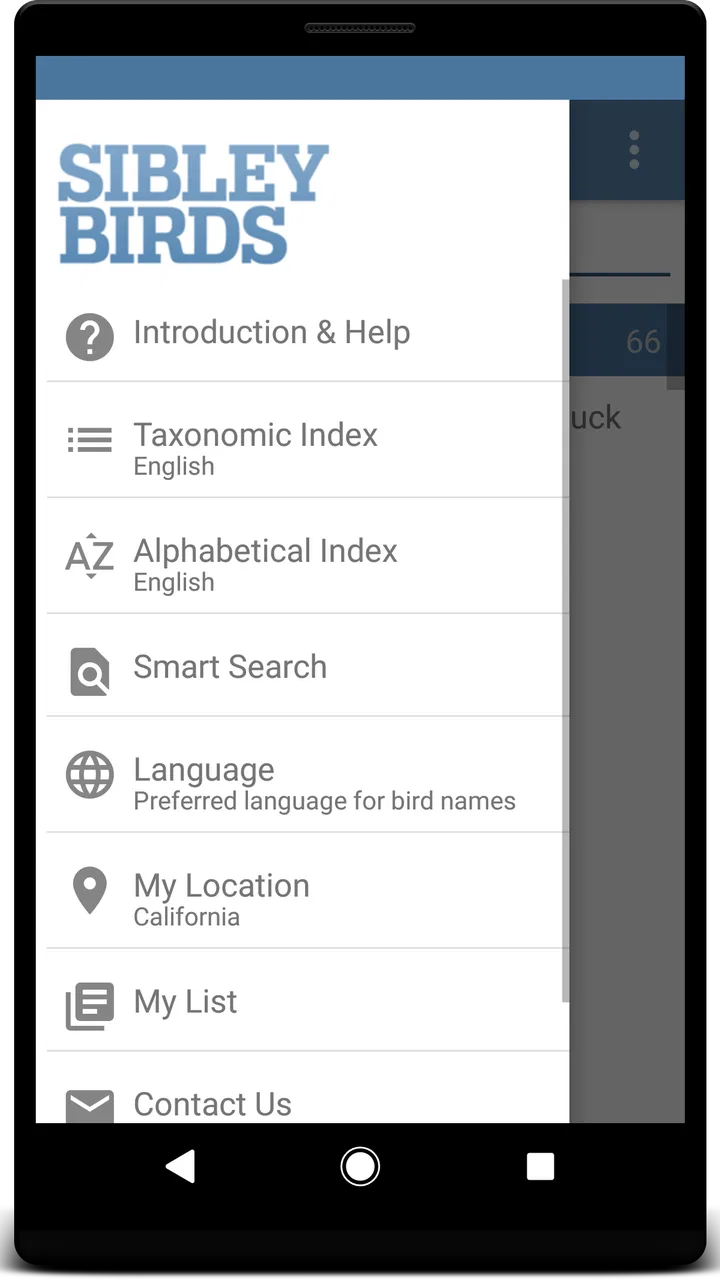
- Covers North American birds with detailed range maps and seasonal information.
- Audio recordings make identifying unfamiliar calls easier in the field.
- Search tools quickly filter birds by location
- habitat
- size
- or appearance.
- Species accounts include useful notes on behavior
- nesting
- and identification.
- Works well as a portable field guide without carrying a heavy printed book.
Cons
- The large catalog may feel overwhelming for beginners learning bird families.
- Some advanced identification details require careful comparison between similar species.
- Audio and image content can use considerable storage space on your device.
- Regional coverage may be less useful for birders outside North America.
- A paid app may seem expensive compared with basic free bird-identification tools.

Sibley Birds 2nd Edition
Gallery